How to Build and Understand AI Automation in Marketing Workflows
Integrating ai automation in marketing changes how you connect with your audience. You are no longer manually moving data from one spreadsheet to another or writing fifty variations of the same email. Instead, you are building systems that think, adapt, and execute tasks on their own.
By the end of this tutorial, you will understand how to identify bottlenecks in your marketing funnel, select the right tools to fix them, and build automated workflows that actually generate revenue. You will not just learn what buttons to click. You will understand the logic behind these systems so you can build your own custom solutions later.
Before we start, you need a basic understanding of your current customer journey. You should know how a stranger finds your business, how they become a lead, and how they eventually make a purchase. If you have that mapped out in your head, you are ready to begin.
The Core Mechanics: Why AI Automation Works Differently
You might be wondering why we treat AI differently than the software you already use. It helps to look at how traditional systems work first.
Standard marketing automation runs on strict rules. You build a path based on “if/then” statements. If a user downloads a PDF, then the system sends them a welcome email. If they click the link inside, then they get tagged as interested. This is helpful, but it is entirely rigid. The software only does exactly what you told it to do.
Artificial intelligence operates differently. It relies on pattern recognition and prediction. Instead of just following a rigid path, an AI system analyzes thousands of past interactions to determine the best next step. It does not just send the welcome email — it looks at the user’s browsing behavior, predicts what specific problem they are trying to solve, and rewrites the email subject line to match their specific interest.
When you grasp this difference, building workflows becomes much easier. You stop trying to map out every single possible scenario manually. Instead, you build guardrails and let the AI figure out the optimal path for each individual user.
Step 1: Mapping Your Current Friction Points
The biggest mistake you can make is buying automation software before you know what problem you are trying to solve. Adding technology to a broken process just makes it break faster.
Before touching any tools, look at your daily operations. Find the areas where your team spends the most time doing repetitive, low-value work. These are your friction points.
Here are two highly common areas where bottlenecks happen:
Lead Generation Filtering
Your website might bring in hundreds of leads a week, but your sales team only has time to call fifty of them. Right now, a human being probably looks at those leads and guesses which ones are worth contacting based on job titles or company size. This is a massive waste of human intellect.
Content Creation Bottlenecks
You write a great blog post. Now you need three social media posts, two email newsletters, and an ad script based on that same topic. Staring at a blank page to reword the same ideas takes hours.
You need to write down exactly where your time is leaking. Once you have your list of friction points, you can match them to the right technology.
Step 2: Choosing the Right Automation Software
Now that you know what needs fixing, you have to select the tools that will do the work. The landscape of AI tools is massive, but you can generally divide them into two categories based on what they do.
Generative AI Tools
These systems create things. They write text, generate images, and write code. When you are looking to fix content creation bottlenecks, you need generative AI. These tools take a starting prompt and produce original material based on the parameters you set.
Predictive AI Tools
These systems analyze numbers and behaviors to guess what will happen next. They look at your past sales data to figure out which leads are most likely to buy, or which ad copy will perform best on a Tuesday afternoon.
For a wider view of how this technology functions across your entire business, reviewing the complete guide to AI automation will give you a solid baseline before you start buying software subscriptions.
So at this point, you understand the difference between standard if/then logic and AI, you have identified your friction points, and you know the difference between generative and predictive tools. Now we need to actually build a workflow.
Step 3: Engineering the Workflow
This next part looks complicated, but it is actually simpler than it appears once you break it down into steps. We are going to build a theoretical workflow for email marketing.
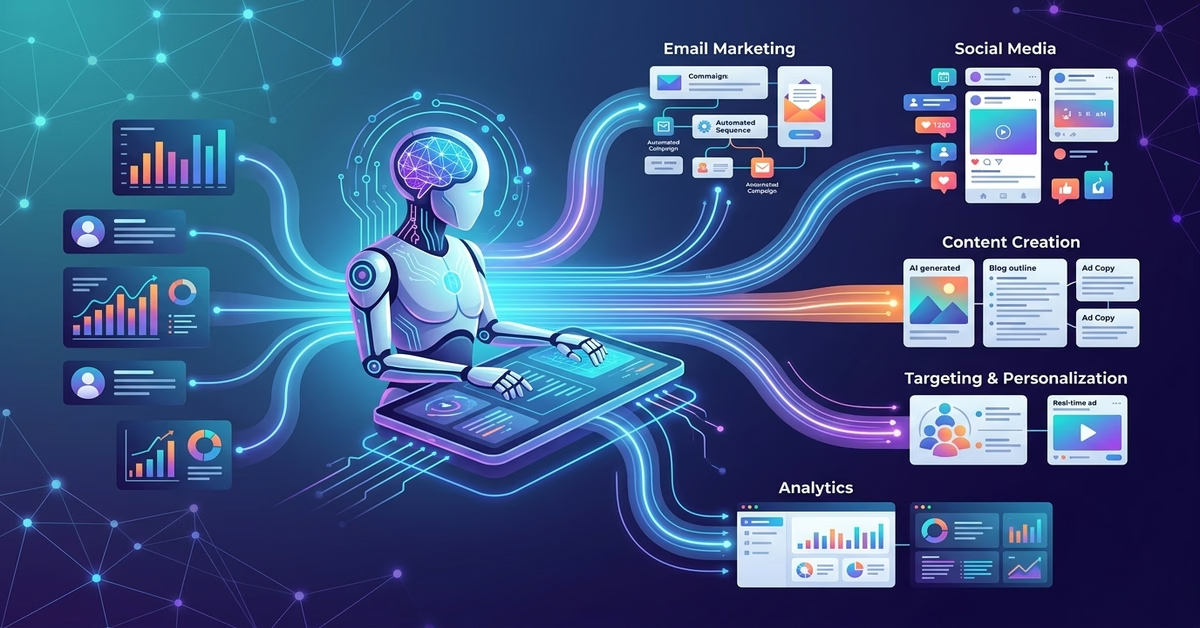
Let’s assume your friction point is a lack of personalization. You send the exact same weekly newsletter to 10,000 people, and your open rates are dropping. You want to use customer targeting to send highly specific emails, but writing 10 different newsletters manually is impossible.
Here is how you structure an AI-driven workflow to handle this:
- The Trigger Event: A user visits your website and reads three different articles about dog training, then joins your mailing list.
- The Data Capture: Your tracking software logs their reading history and sends that data to your central database.
- The AI Analysis: A predictive modeling tool looks at the data. It tags this user’s primary interest as “dog training” rather than “cat nutrition.”
- The Generative Step: Your generative AI tool is connected to your email platform. When it is time to send the weekly newsletter, the system feeds the core topics to the AI. It instructs the AI to rewrite the introduction of the email to focus heavily on dog training.
- The Delivery: The personalized email goes out. The user reads an introduction that speaks directly to the exact problem they were researching yesterday.
This works because you are combining tools. The predictive tool handles the logic (figuring out what the user wants), and the generative tool handles the labor (writing the custom text).
When you start designing these systems for yourself, seeing how other companies succeeded makes the process much clearer. You can study real world AI automation examples and success stories to see exact workflows that generated revenue.
Keeping the Human in the Loop
You might be tempted to let these systems run entirely on their own. Do not do this. AI models make mistakes. They can hallucinate facts, write in a tone that doesn’t match your brand, or send aggressive follow-up emails if configured poorly.
Always build an approval step into your early workflows. Have the AI generate the personalized emails and save them as drafts. A human team member should spend ten minutes reviewing the drafts before hitting send. As the system proves its reliability over a few months, you can slowly remove the human review step for low-risk tasks.
Step 4: Campaign Optimization and Tracking Success
If you apply AI to your marketing but do not measure the financial impact, you are just guessing. Tracking the success of AI automation requires a different approach than standard analytics.
You are not just looking for higher open rates or more clicks. You need to focus heavily on ROI tracking. How much time did the system save, and how much extra revenue did it generate?
Here is the best way to test if your new AI workflow is actually helping: The Control Group Test.
Take your next big marketing campaign and split your audience perfectly in half.
For Group A, run your campaign the traditional way. Have your team write the emails, manually select the target audience, and adjust the ad spend by hand.
For Group B, use your new AI automation in marketing workflow. Let the predictive modeling handle the audience segments and let the generative tools draft the copy variations.
Run the campaign for two weeks. When it is over, compare the exact cost of acquiring a customer in Group A versus Group B. Also, ask your team to log how many hours they spent managing Group A versus monitoring Group B.
When you explain the value of AI to your leadership team, you will not talk about algorithms or prompts. You will say, “The AI workflow generated leads for three dollars less per person, and it saved our team fourteen hours of manual labor this week.” That is the metric that matters.
Preparing for the Next Shift in Technology
The workflows you build today will eventually need updates. The artificial intelligence space moves incredibly fast. Today, we are mostly dealing with text and image generation. Tomorrow, AI might be dynamically generating full video ads customized to the viewer in real time.
Marketing moves fast, and staying ahead means anticipating what comes next. To prepare your systems for the next wave, keep an eye on the top 10 AI automation trends to watch in 2026.
When you build your current systems, build them loosely. Do not sign five-year contracts for software that locks you into one way of doing things. Choose platforms that connect easily with other tools using basic API connections. This guarantees that when a better AI model comes out next year, you can unplug the old one and plug the new one in without tearing down your entire marketing funnel.
Frequently Asked Questions
Will using AI automation make my marketing sound robotic?
It only sounds robotic if you use default settings. Generative AI writes based on the instructions you give it. If you ask it to “write a sales email,” you will get a boring, generic email. If you feed it three of your best-performing past emails and instruct it to mimic your exact tone, pacing, and vocabulary, the output will sound remarkably human. The quality of the output depends entirely on the quality of your instructions.
How much data do I need for predictive modeling to actually work?
Predictive tools need a baseline to spot patterns. If your website gets ten visitors a month, AI cannot help you predict behavior because there is no statistical significance. Generally, you need thousands of interactions — clicks, email opens, or purchases — before a predictive model can accurately guess what a user will do next. If you have low traffic, focus on generative AI for content creation first, and save predictive tools for later.
What is the most common use case for a beginner?
The safest and most effective starting point is repurposing content. Take a long-form video or a massive whitepaper you already created. Set up a workflow where an AI tool digests that large file and automatically creates ten short social media posts, a summarizing email, and a list of FAQ questions from the material. This provides immediate time savings with very low risk.
Conclusion
Understanding how to use ai automation in marketing is no longer an optional skill. It is the foundation of how modern businesses speak to their customers at scale.
Remember the core lessons from this tutorial. Start by mapping out the exact friction points where your team loses time. Choose generative tools to fix content problems and predictive tools to fix targeting problems. Always keep a human in the loop while the system learns, and ruthlessly measure your ROI to ensure the technology is actually serving your business.
You now have the structural knowledge to look at your own marketing funnel, identify where it is broken, and apply intelligent automation to fix it. Start small, build your first automated sequence this week, and watch how it changes the way you work.